Why PageSpeed matters (and what usually slows a site down)
· 5 min read · Kelly
Most slow websites aren’t slow for any exotic reason. They’re slow because a few basic things got skipped and nobody went back to check. The annoying part is that the business losing customers to a sluggish site usually has no idea it’s happening.
So here’s a no-jargon look at what website speed is, why it’s worth caring about, and the handful of things that cause most of the trouble.
What people mean by “PageSpeed”
Usually they mean Google PageSpeed Insights, a free tool that grades your site out of 100. Behind that score is a set of measurements Google calls Core Web Vitals. You don’t need the jargon, but three of them are worth knowing in plain words:
- How fast the main content shows up. The big heading or hero image should appear in about 2.5 seconds or less.
- How fast the page reacts when you tap something. If a button feels laggy, this is what’s failing.
- Whether the page stays put while it loads. You’ve felt this one: you go to tap a link and everything jumps because an image loaded late and shoved the page down.
Fast to appear, quick to react, doesn’t jump around. That’s basically the whole test.
Why bother
A few reasons, and none of them are abstract.
People leave slow sites. On a phone, on an average connection, every extra second of loading sends more visitors back to the search results before they’ve seen a thing. You spent money or effort getting them there, and a slow page throws that away.
Google notices too. Speed is part of how it ranks pages. Put two similar businesses side by side and the faster site tends to land higher, and the higher spot is the one that gets clicked.
Then there’s the gut-feel side. A site that loads instantly makes a business look like it has its act together. One that stutters makes people hesitate, even if they couldn’t tell you why.
One thing worth remembering: most of your visitors are on phones, often not on great wifi. The site that feels quick on your office desktop isn’t the site they’re actually using.
What usually causes it
After you’ve looked at enough slow sites, the same culprits keep showing up.
Huge images. This is the big one. Someone drops a photo straight off their phone, 4,000 pixels wide and several megabytes, into a spot that shows it the size of a stamp. The browser downloads the whole thing anyway. Resize images to the size they actually appear, compress them, and use a modern format like WebP. A five-megabyte photo can come down to under 100 kilobytes and look identical.
Plugin and script sprawl. This one’s especially common on WordPress sites that have grown over the years. Every plugin and tracking tag is more code the browser has to fetch and run before the page works. A simple brochure site can end up dragging around megabytes of JavaScript just for a contact form and a slider.
Files that block the page from showing. Certain stylesheets and scripts stop everything until they’ve loaded. If they’re sitting in the way, your visitor watches a blank screen while they wait. The fix is making sure only the essentials load first and the rest gets out of the way.
Cheap hosting with no CDN. Budget shared hosting usually serves your whole site from a single server in one location. A CDN keeps copies closer to your visitors, and caching makes repeat visits almost instant. Skip both and your site is stuck at the speed of one slow machine.
Fonts loaded carelessly. Custom fonts are fine. Loaded the wrong way, they either leave your text invisible for a moment while the font downloads, or cause that little jump when the real font swaps in.
Images with no reserved space. When the browser doesn’t know how big something will be, it guesses, then rearranges the page once the real thing arrives. That’s the jumping-around problem again, and telling the browser the dimensions up front avoids it.
Only testing on your own computer. Your site feels great on a new laptop on fast office internet. That isn’t your customer. PageSpeed Insights tests on a mid-range phone with a throttled connection on purpose, because it’s closer to reality. It’s a bit of a reality check the first time you run it.
Checking your own site
Go to pagespeed.web.dev, paste in your address, and read the mobile results. Mobile is the honest one; desktop almost always looks better than real life. The score is colour-coded: red is a real problem, orange means it could be better, and green (90 and up) is where you want to be. It also gives you a list of specific issues with rough time savings, which makes a pretty good free to-do list.
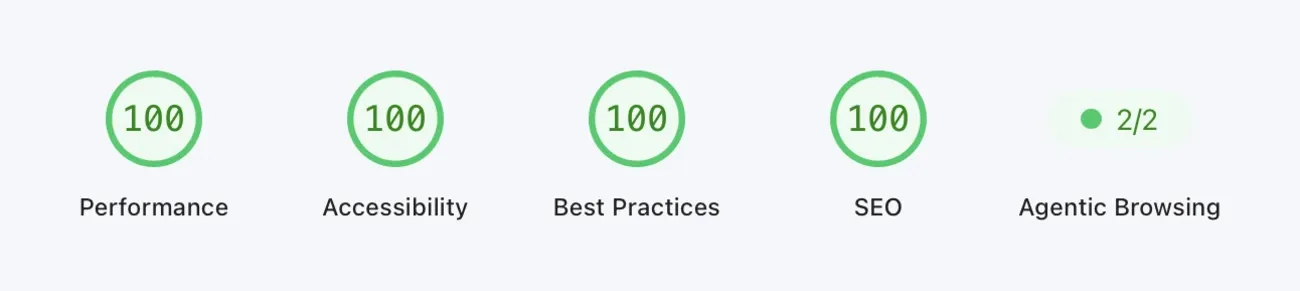
For what it’s worth, that’s this site’s current result. We don’t write this stuff in theory.
The short version
A site that’s built properly loads its main content in a couple of seconds on a phone, reacts right away, and holds still while it does. There’s no trick to it. It comes from lean code, images done right, fonts and styles handled with a bit of care, and decent hosting. Speed isn’t something you add at the end. It’s what you’re left with when nothing important got skipped.
If you’re not sure where your site stands, run it through the tool above — or grab a free website audit and we’ll send you a short, plain-English rundown of what’s slowing yours down. No pressure either way.